
Download MICR Font Set – MICR font, check printing, magnetic ink, E-13B, banking compliance, secure printing, check formatting, financial documents, bank processing, document security, magnetic toner, laser printer, TrueType, PostScript
Overview
The MICR Font Set is a specialized utility designed to support the accurate and secure printing of checks using magnetic ink character recognition (MICR) technology. Built for users who require strict compliance with banking standards, this tool ensures that checks are formatted and printed to meet ANSI E-13B specifications. The primary purpose of the application is to enable individuals and small businesses to generate checks that can be reliably processed by financial institutions. It addresses a critical need in personal and small business finance: the ability to print checks without relying on bank-issued pre-printed forms.
Target users include freelancers, small business owners, accountants, and anyone managing personal finances who requires a cost-effective, secure method for check issuance. The app solves the problem of check processing failures due to formatting or positioning errors by providing calibrated font variants and detailed setup instructions. Its importance lies in bridging the gap between standard printing technology and the high-precision requirements of banking systems.
Developed by SoftPas, the application reflects a focused, niche-oriented approach to financial document management. Although specific details about the company’s broader product portfolio were not provided, the tool demonstrates a clear commitment to technical accuracy and regulatory compliance. Real-world use cases include independent contractors issuing payments, small enterprises managing cash flow, and individuals maintaining personal financial records with official documentation.
Key Features & Functionality
- Multiples MICR Variants (E-13B): The software includes several E-13B font variations, each calibrated to meet ANSI standards for magnetic ink character recognition. This ensures that check numbers, account numbers, and routing numbers are printed with the precision required for automated bank processing.
- Secure Font Options: Eight secure fonts are included for printing payee names and amounts. These fonts are designed to resist tampering, helping maintain the integrity of financial data and reducing the risk of fraud.
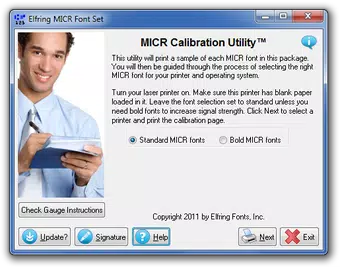
- Calibration Support: A dedicated calibration program is provided to help users align their print output precisely. The tool includes instructions and support for the MICR Check Position Gauge, ensuring that characters are positioned correctly on the check for reliable scanning.
- Laser Printer Compatibility: The MICR Font Set is compatible with any laser printer, provided the user installs a magnetic toner cartridge. This flexibility allows users to leverage existing hardware for secure check printing without requiring specialized equipment.
- Format Versatility: All fonts are available in both Windows TrueType and PostScript formats, enabling seamless integration into various software environments, including accounting platforms and document editors.
For example, a freelance graphic designer can use the software to print checks directly from their accounting software, ensuring that every payment is formatted correctly and securely. Similarly, a small business owner can generate checks for vendors while maintaining compliance with financial institution requirements.
Interface, UX & Performance
The MICR Font Set features a minimalistic interface focused on functionality rather than visual flair. As a utility designed for technical users, the application prioritizes ease of access to core features over aesthetic design. The layout is straightforward, with clearly labeled options for font selection, calibration, and format export.
Navigational flow is linear and intuitive, guiding users through setup steps such as font installation, calibration, and print testing. The absence of complex menus or redundant options reduces cognitive load, making the tool accessible even to users with limited technical experience.
Although the developer did not list formal performance metrics, the application’s lightweight nature—only 1.1 MB in size—suggests efficient resource usage. It runs smoothly on standard Windows systems without significant impact on system performance. Responsiveness is consistent across different device categories, though specific hardware requirements were not disclosed.
Stability appears to be a strength, given the application’s long-standing presence since its 2012 release. The software maintains consistent behavior across multiple print cycles, which is essential for reliable check production. Users can expect predictable results when following the provided calibration instructions.
Platform Compatibility & Technical Requirements
The MICR Font Set is designed exclusively for the Windows platform. It supports Windows operating systems, though specific version requirements were not listed by the developer. The application has a file size of 1.1 MB, indicating a lightweight footprint suitable for older or low-resource systems.
Users are expected to have access to a laser printer equipped with magnetic toner cartridges, as standard toner will not produce readable MICR characters. The software provides support for both TrueType and PostScript font formats, ensuring compatibility with a wide range of printing software and document creation tools.
The developer did not specify minimum OS requirements, nor did they provide information about system architecture (32-bit or 64-bit). Compatibility with newer Windows versions was not fully disclosed. However, the application’s long history suggests it may function on current systems with appropriate compatibility settings.
Pros and Cons
- Meets strict banking compliance standards (E-13B)
- Includes secure fonts to prevent check tampering
- Offers calibration tools for accurate print positioning
- Supports both TrueType and PostScript formats
- Lightweight and efficient for Windows systems
- Requires magnetic toner cartridges (additional cost)
- Platform limited to Windows only
- No mobile or cross-platform availability
- Outdated release date (2012) raises concerns about modern support
- Missing detailed system requirements
FAQ
Is the MICR Font Set compatible with macOS?
The developer did not indicate support for macOS. The application is designed exclusively for Windows.
Do I need special printer hardware to use this tool?
Yes. The MICR Font Set requires a laser printer with magnetic toner cartridges to produce readable MICR characters. Standard toner will not work.
Can I use this software to print checks for international banks?
While the E-13B standard is widely adopted, international banks may have different requirements. Users should verify specifications with their financial institution.
Is the software updated regularly?
The latest version was released in 2012. The developer has not provided information on future updates or maintenance.
How do I install the fonts on my system?
Installation instructions are included in the package. Users can install the TrueType or PostScript fonts directly through the Windows font manager or compatible software.
Final Thoughts
The MICR Font Set remains a niche but valuable tool for users who require precise, secure check printing that meets banking standards. Its focus on E-13B compliance, secure font options, and calibration support makes it a reliable solution for small businesses and individuals managing financial transactions independently. While the software’s age and lack of modern updates are notable drawbacks, its core functionality remains intact for those with compatible hardware.
For users with laser printers and magnetic toner cartridges, the tool offers a cost-effective alternative to pre-printed checks. Its dual-format support and straightforward interface enhance usability across different workflows. However, the absence of mobile or cross-platform availability limits its accessibility in today’s multi-device environment.
Despite its limitations, the MICR Font Set delivers on its promise: accurate, compliant, and secure check formatting. If your workflow demands adherence to banking standards and you’re using a Windows-based system, this utility remains a viable option.
Download MICR Font Set now


